What is CAPA? Corrective action steps in IMS Cortex
An audit turns up a nonconformity, a customer complaint arrives, or a machine stops twice in two weeks. What these have in common is that opening a record does not finish the job: someone has to find the cause, own the action and, six months later, check that it actually worked. Quality teams call this process CAPA.
What CAPA means
CAPA stands for corrective and preventive action. A record is opened for a nonconformity, the root cause is investigated, an action is defined and, afterwards, the action is measured for effectiveness. On paper that is a four-line recipe. On the shop floor, what usually goes wrong is that nobody can see who owns each of those four steps or where a record is waiting.
IMS Cortex is a quality management product and CAPA is one of its modules. The product is built on the Zeyrek platform, so its pages, flows and endpoints are platform data. The neighbouring modules are document management, tasks and actions, audits and surveys. The flow below is the process as it is set up in the CAPA module.
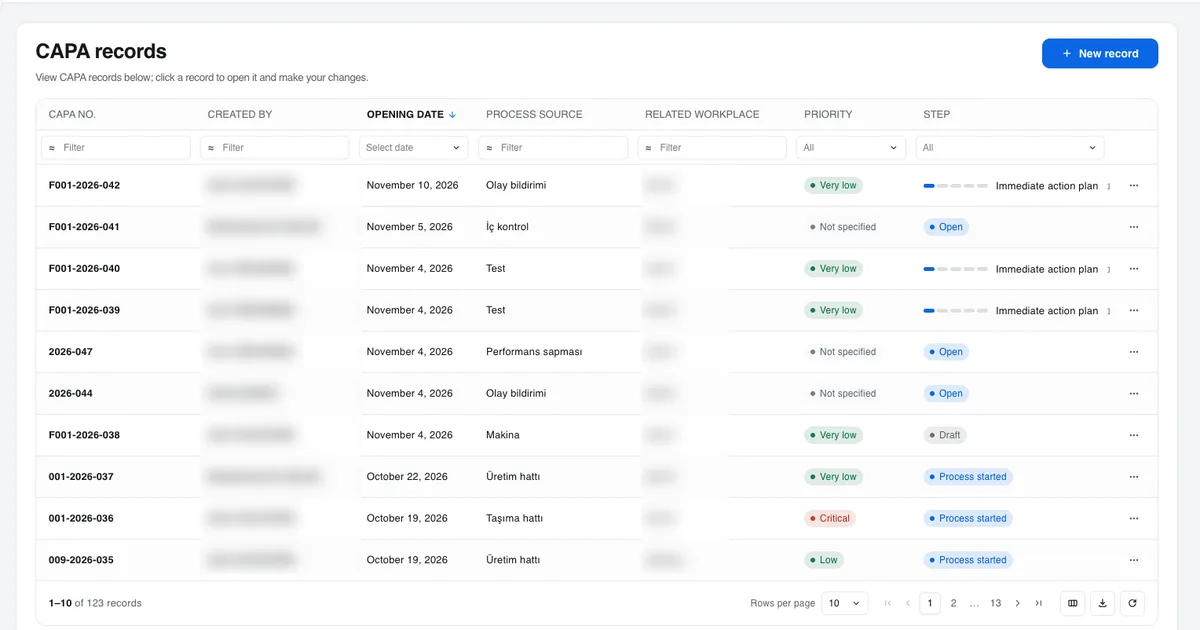
Records live in one list
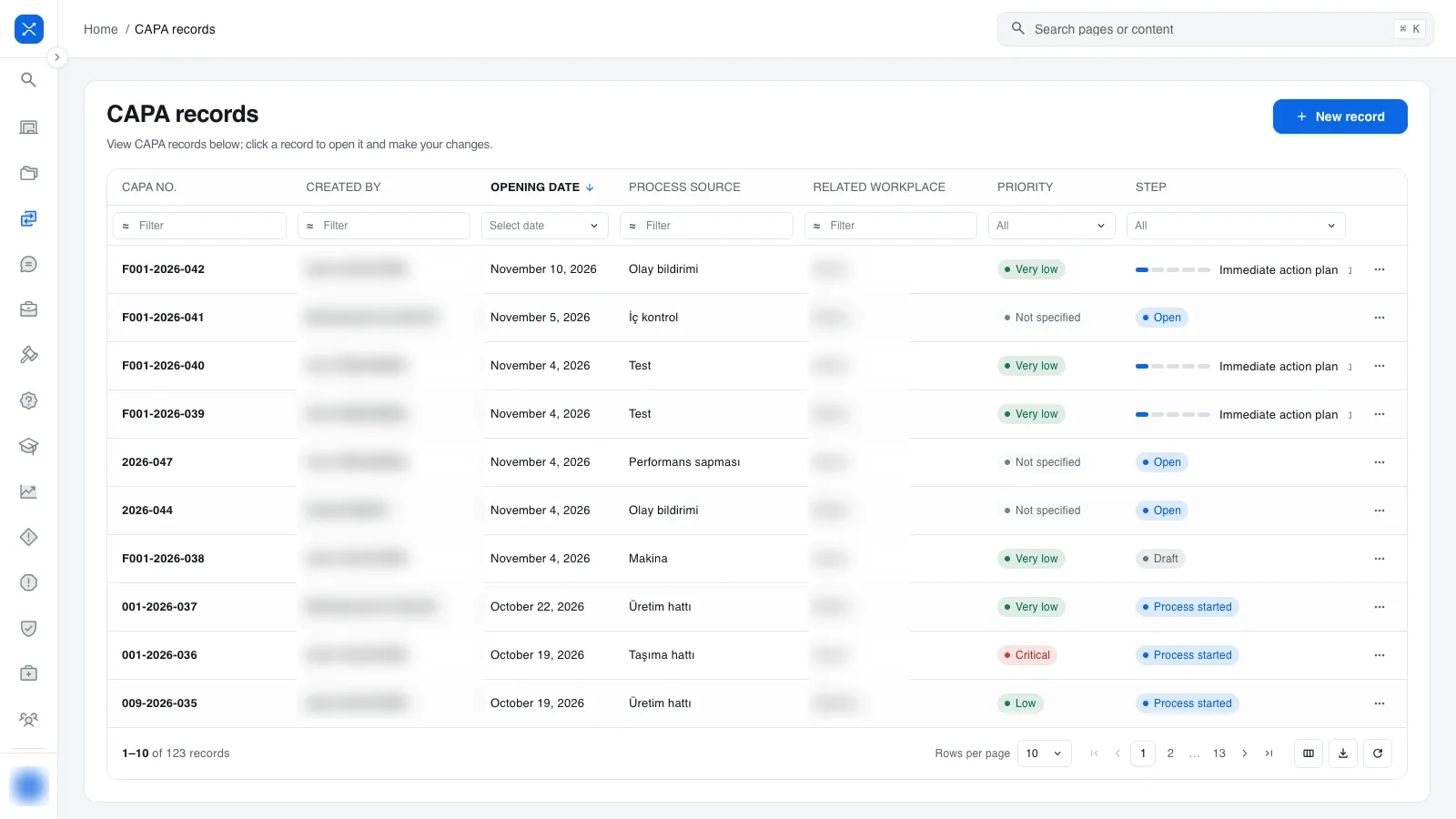
A record number is made of a company code, the year and a sequence number (for example 001-2026-027), so anyone
reading the number can tell which year the record belongs to.
Every row has a priority and a step column. The step column shows how many steps of the process are done as n/N;
the priority colour runs from green for very low to red for critical, and a record without a priority reads "Not
specified". That is what lets a quality manager answer "which record is waiting on whom" from the list. Column
filters sit right under the headers, and filtering and sorting happen on the server.
A record starts as a draft
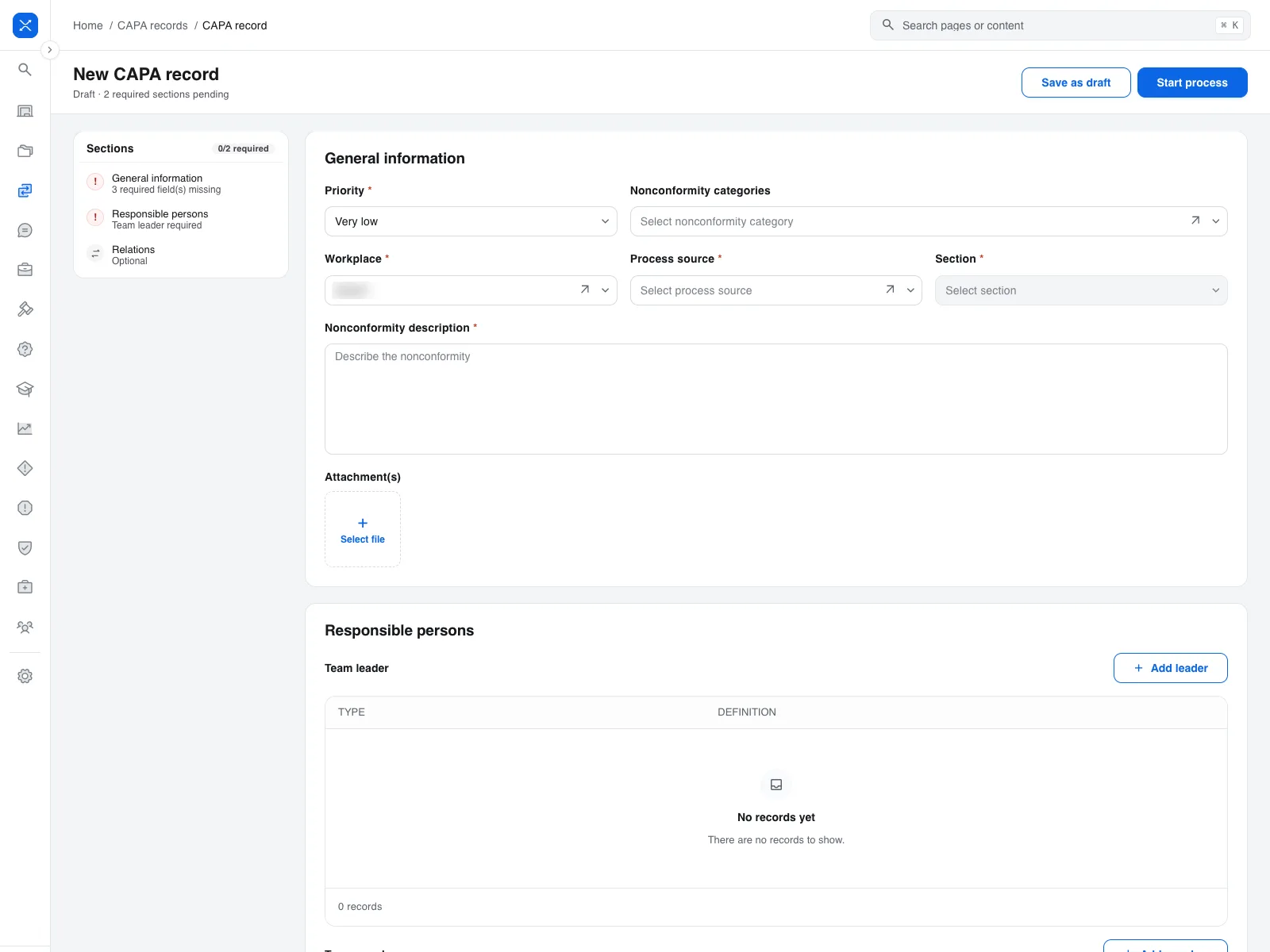
A new record does not enter the process on its own. In form mode the sections stack as cards: general information, responsible persons, relations and history. The list on the left counts the missing required fields, whether a team leader has been entered and how many relations exist, live. The top bar has two buttons: "Save as draft" and "Start process".
The Responsible persons card says whose job the record is. The person who opened it and the team leader show up there. To edit the general information later, the user needs the update permission, must be the one who opened the record or its team leader, and the record must not be closed.
Pressing "Start process" sends the record to opening approval. An approved record moves on to the sequence steps; a rejected record does not enter the process.
Once the process starts: five sequence steps
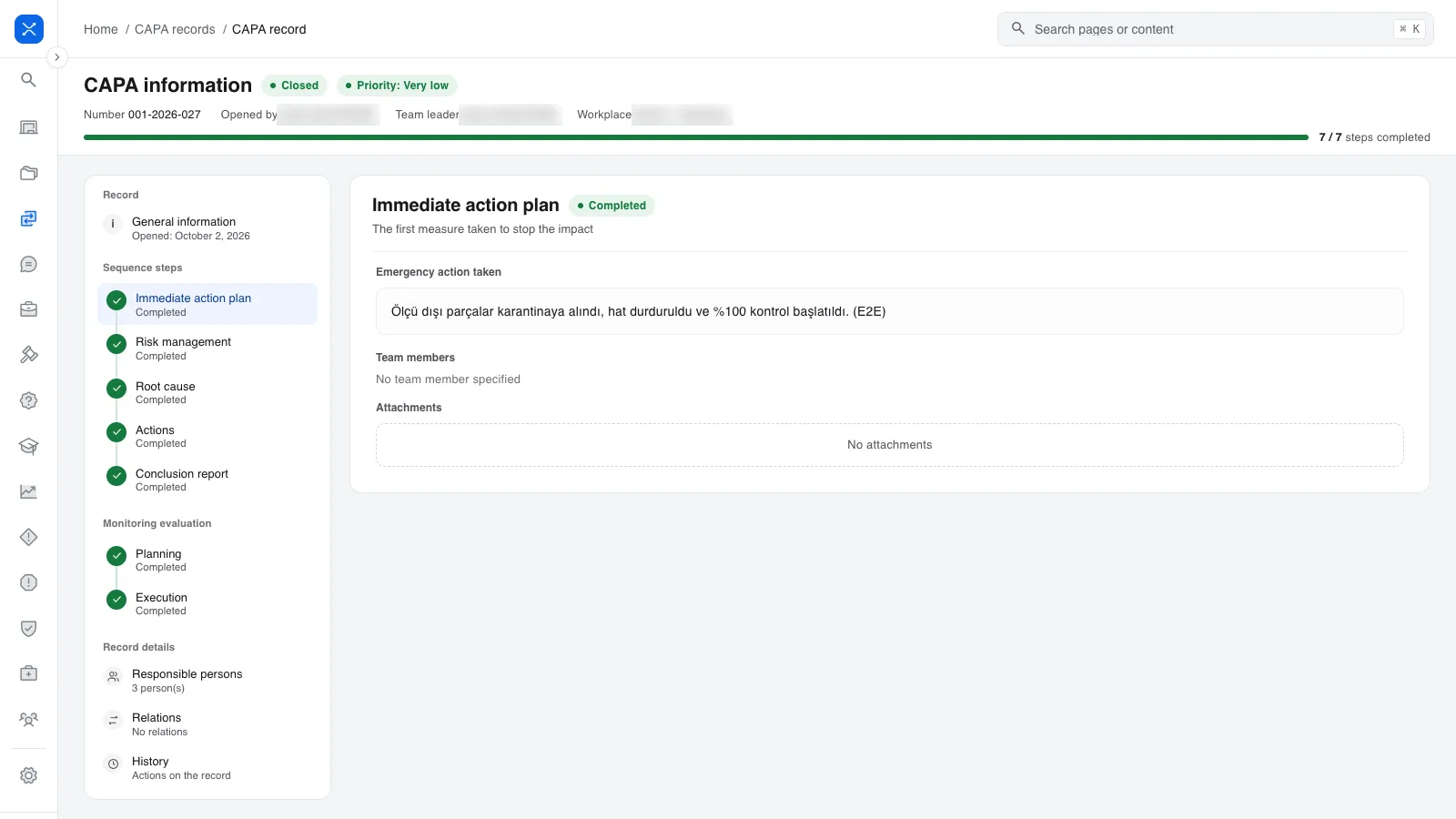
After the record is approved it switches to process mode. The step rail is on the left, the content of the current step on the right, and the progress bar at the top shows how many steps are done. The steps are:
- Immediate action plan. The temporary measure that stops the damage until the root cause is found.
- Risk management. Assessing the risk the nonconformity carries.
- Root cause. Analysis uses why-why and fishbone diagrams.
- Actions. Every action has an owner and a date, and goes through approval when it is opened and when it is closed. The person who takes the action submits the completion from their own screen.
- Conclusion report. The result, recommendations and attachments. When this step is complete the record is ready to be closed.
All five steps can be switched off in settings. In an organisation without an immediate action plan that step never appears on the record; in one that does not use monitoring, the process ends with the closing approval.
One detail matters here: the step list is written onto the record when it is opened. When a parameter changes later, open records are not affected and new records open with the new list. The steps of a record that is already in progress do not shift when someone changes a setting.
When a record is closed and the actions step is on, at least one completed action is required. Closing without an action is possible only in organisations where the actions step is switched off.
Monitoring: before you say "it worked"
After the closing approval, monitoring can be opened. It has two parts: first it is planned, then the planned monitoring is carried out. When the last monitoring is completed, the closing approval flow runs again. Whether the action was effective stays inside the record this way and does not end up in a separate follow-up sheet.
The approval chain follows the organisation's structure
The CAPA module defines five separate approval flows: request, record, closing, action creation and action closing. Each flow has its own steps.
An approval step can target a single person, but also a company, a role, a department, a group or a position. A step targeted at a role opens a task for everyone in that role; when the step's minimum approval count is reached, the remaining tasks are closed by the system. If two separate approval steps sit in the same order, both are required.
Permissions work with two settings. Dynamic roles are calculated from the record's own data ("the person who opened the request", for instance), and the permission matrix maps permission groups to functions. So "who sees this record, who edits it, who approves it" is defined role by role, not person by person.
The request path: not everyone opens a record
Not every nonconformity has to become a CAPA record straight away. The module has a separate request path: a request is opened, goes through the request approval flow and, once approved, a record is opened. A rejected request does not turn into a record. The quality team filters incoming reports this way and the number of records stays limited to real nonconformities.
Settings: the organisation's own vocabulary
The CAPA settings pages hold the following: process sources (where the nonconformity came from), root causes, nonconformity categories, parameters, dynamic roles, the permission matrix and flow management. The parameters page has eleven parameters; switching steps on or off is there too.
These lists do not ship fixed with the product, which means an organisation can use its own category and source names.
Reports
The module produces four reports: the records report, task tracking, the status report and the effectiveness evaluation report. All four use the same table pattern: column filters, advanced filter, column selection, refresh and Excel download. Filtering and sorting happen on the server, and the downloaded Excel file keeps the filter and the order on the screen. Someone who filters a report and downloads it does not open a different file from the one they saw.
What is not in scope today
A product story is incomplete without its gaps. Not in the CAPA module today: postponing, cancelling, redirecting and evaluating actions; cancelling a CAPA; a detail request; copying a record; periodic monitoring; record maintenance and autosave. If a requirements list contains any of these, knowing it at the start of the conversation saves both sides time.
Where to start
Before moving a CAPA process into software, three answers should be clear: which steps exist in your organisation, who approves each step, and who measures effectiveness after closure. In IMS Cortex those three answers are written in the parameters page, flow management and the monitoring step, in that order. The CAPA module page describes the module in short form.
Frequently asked questions
Does every nonconformity have to become a CAPA record?
No. A separate request path exists: a request is opened, approved through the request approval flow, and only then does a record open. Rejected requests never turn into records.
Can the steps be switched off?
Yes. Each of the five sequence steps can be switched off in the parameters page. A switched-off step does not appear on the record. The step list is written onto a record when it is opened, so changing a parameter does not affect records that are already open.
Who can approve a step?
An approval step can target a person, a company, a role, a department, a group or a position. A step targeted at a role opens a task for everyone in that role, and the remaining tasks close when the minimum approval count is reached.
What does the module not cover yet?
Postponing, cancelling, redirecting and evaluating actions; cancelling a CAPA; a detail request; copying a record; periodic monitoring; record maintenance and autosave.